Remote Terminal Relay & Cloud IDE
Zero-config, real-time, multi-user remote terminal sharing and lightweight Cloud IDE with AES-GCM 256-bit End-to-End Encryption (E2EE), resizable File Explorer, CodeMirror editor, and embedded browser preview in a single binary.
curl -sSf https://rmte.biz.id/install.sh | sh -s run
Interface & Dashboard Showcase
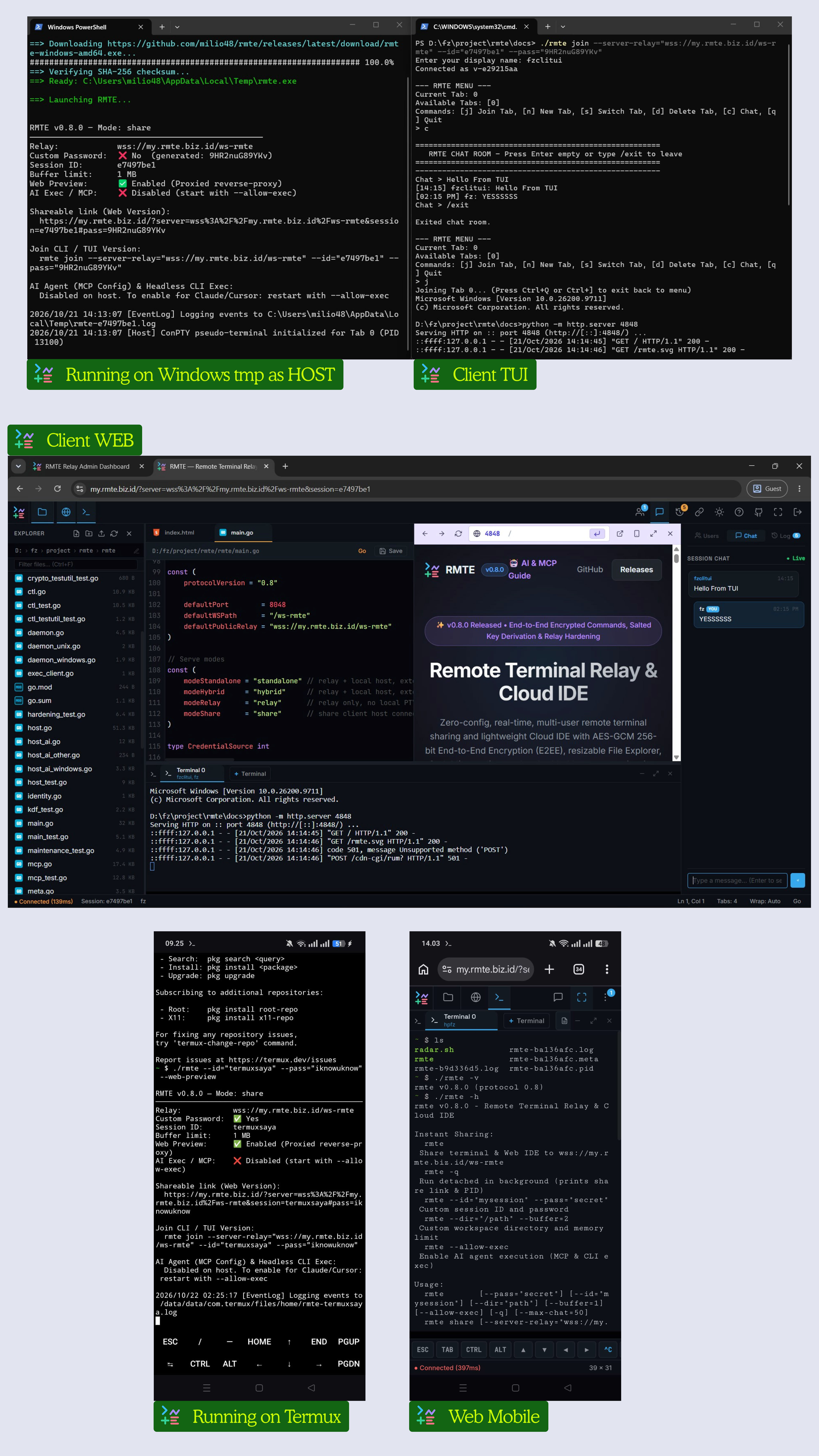
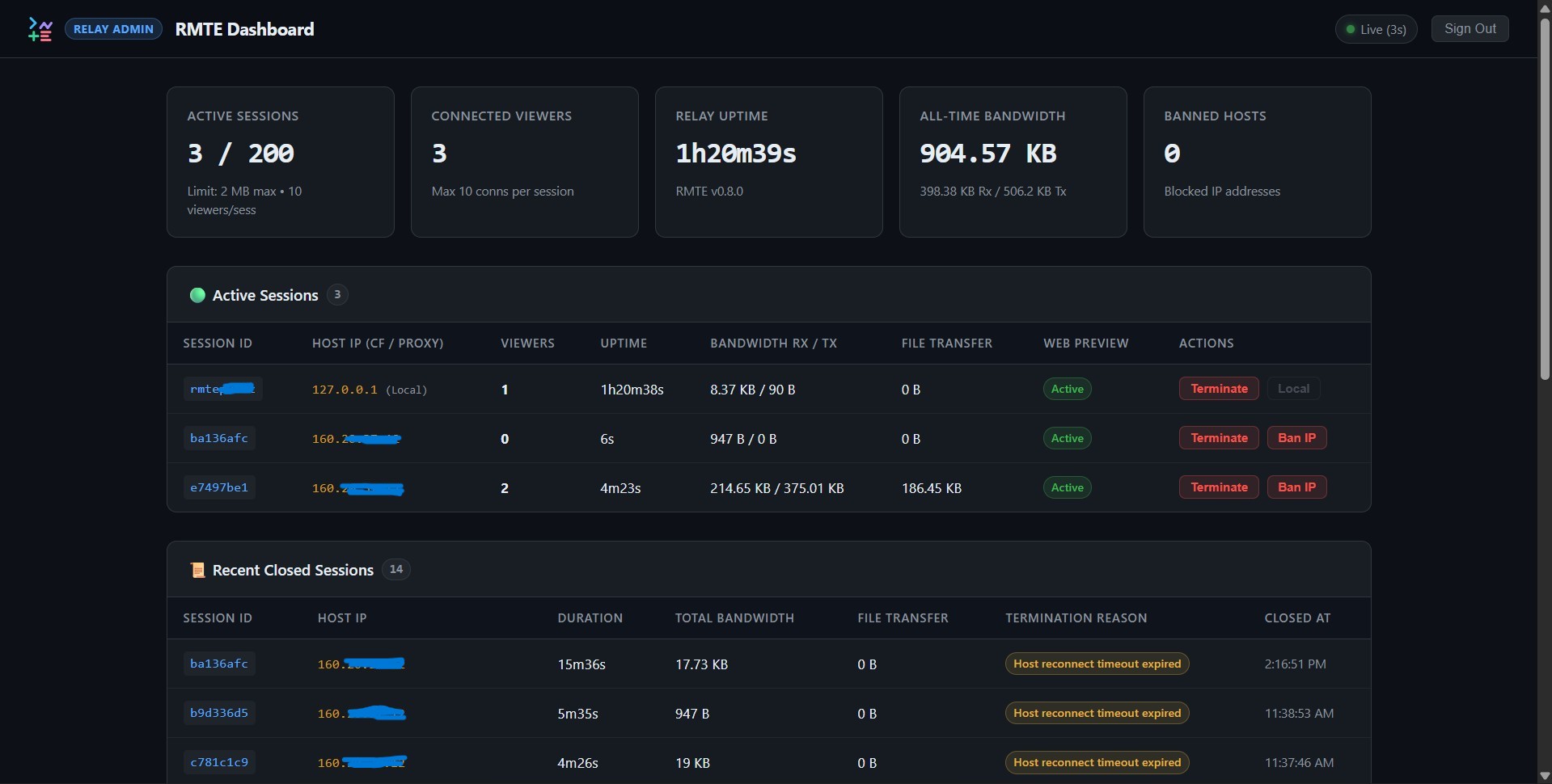
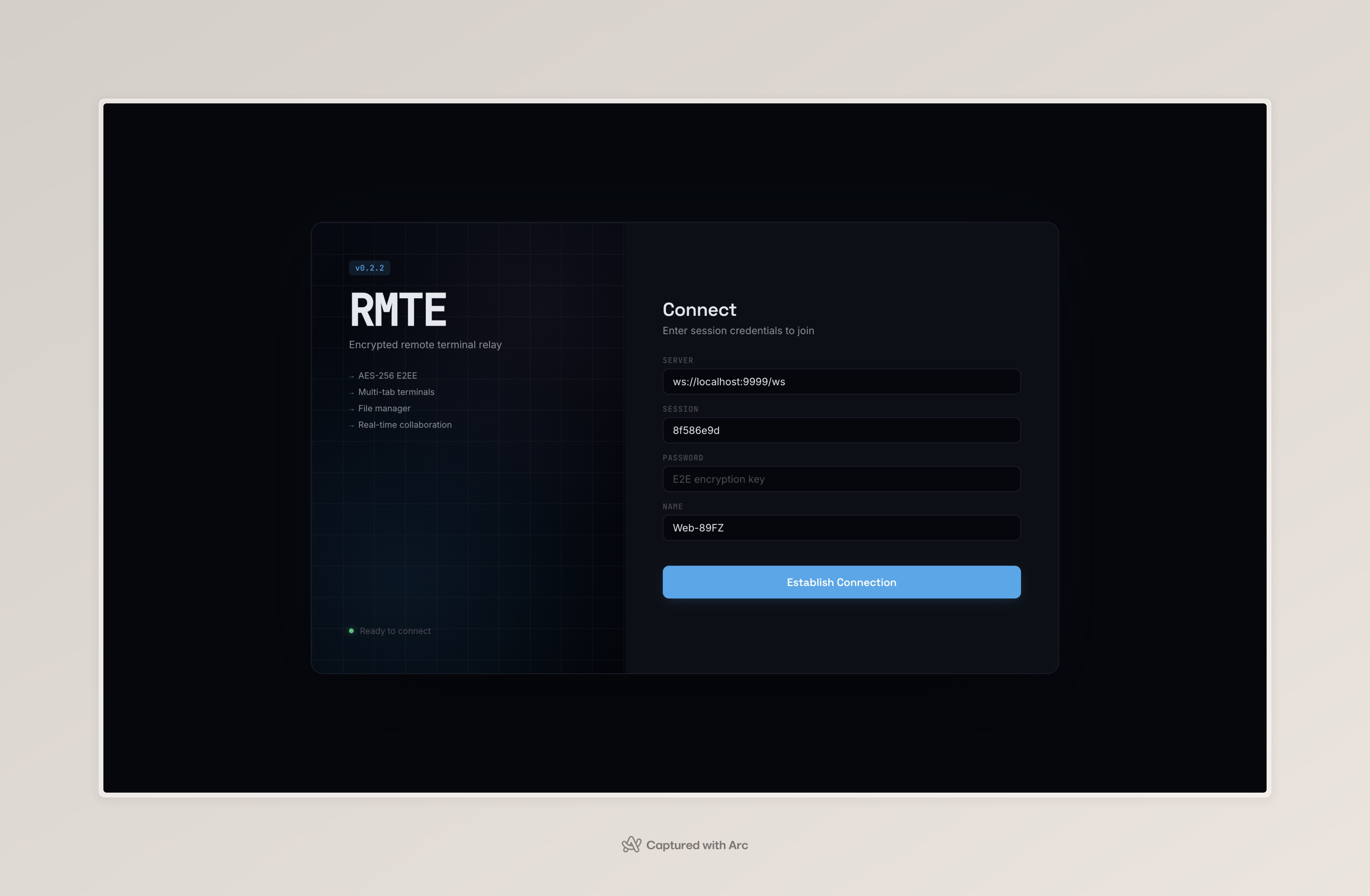
Architecture & Workflow
Outbound-only reverse proxy connecting hosts, relays, and clients with zero open inbound ports and AES-GCM 256-bit E2EE.
How RMTE Connects
End-to-end encrypted terminal, files and commands through an outbound relay
Host Workspace
- Local PTY Shell: Bash, Zsh, or Windows ConPTY
- File Explorer: Workspace filesystem driver
- Browser Preview: Local server reverse proxy
- E2EE Encryptor: AES-GCM 256-bit local key
Requires 0 open inbound ports. Connects through strict firewalls, NAT, and cellular CGNAT.
Relay Server
- WebSocket Router: /ws-rmte routes sealed frames by session
- Web IDE Host: Embedded HTML, CSS & WASM
- HTTP Reverse Proxy: /p/ mini-browser proxy
- Admin Dashboard: Live metrics, bandwidth TX/RX & IP bans (
--admin-pass) - Resource Protection: Session limits, buffer clamping & transport frame guards (
--max-buffer,--max-sessions,--max-viewers) - No Keys: Never receives the password or session keys
Terminal streams, files, commands and chat cross the relay sealed end to end; it only sees routing IDs, sizes and timing. Web Preview traffic and the browser UI the relay serves are not end-to-end protected, so use a relay you trust (or your own) for sensitive work — see SECURITY.md. Self-hosted relays include a built-in /admin web dashboard for real-time bandwidth tracking, active viewer counts, and IP banning.
Web IDE, TUI & AI Clients
Zero-install workspace via browser URL (#id,pass). WebCrypto API decrypts data directly
inside browser memory.
Join directly from any command line via rmte join. Connects through interactive CLI
multiplexer with zero browser overhead.
Connect Claude Desktop, Cursor, Antigravity, or CI/CD automation via rmte mcp and rmte exec over E2EE into isolated [AI] tabs with read-only spectator protection.
AES-GCM 256-bit End-to-End Encryption
Terminal streams, file contents and every control message (file operations, commands, chat) are encrypted and authenticated with keys derived locally via PBKDF2. The password never reaches the relay server.
100% Outbound — Zero Port Forwarding
The host machine initiates a standard outbound WebSocket connection. Works instantly behind corporate firewalls, NAT routers, and hotspot tethering.
Seamless Multi-Client Collaboration
Invite teammates to view or edit via browser URL or native terminal CLI. Includes real-time typing synchronization and terminal resize negotiation.
Command Cheat Sheet
Comprehensive reference guide for all RMTE commands, flags, and deployment topologies.
⚖️ Commands & Modes Comparison
Architectural matrix across all RMTE modes and subcommands.
| Feature / Role | serve --mode=standalone (default) |
serve --mode=hybrid |
serve --mode=relay |
rmte share / rmte |
rmte join |
rmte exec |
rmte mcp |
|---|---|---|---|---|---|---|---|
| Role Summary | Relay + Local Host | Relay + Local Host | Dedicated Relay Only | Outbound Host | Client (TUI) | Client (Headless Exec) | Client (AI MCP Server) |
| Opens Listening Port | ✅ Yes (8048) | ✅ Yes (8048) | ✅ Yes (8048) | ❌ No (Outbound) | ❌ No | ❌ No | ❌ No |
| Local PTY & Files (Host) | ✅ Yes | ✅ Yes | ❌ No | ✅ Yes | ❌ No | ❌ No | ❌ No |
| Accepts External Hosts | ❌ No (Rejected) | ✅ Yes | ✅ Yes | — | — | — | — |
| Prints Session ID & Links | ✅ Yes | ✅ Yes | ❌ No | ✅ Yes | — | — | — |
| Key Flags (full list in Flag Reference) | --pass, --id, --dir, --allow-exec |
--public, --pass, --id, --allow-exec |
--public, --admin-pass, --max-buffer |
--server-relay, --pass, --id, --allow-exec |
--server-relay, --id, --pass |
--server-relay, --id, --pass, --timeout |
--server-relay, --id, --pass |
🚀 Common Command Workflows
Real-world command recipes from the official RMTE documentation:
🚀 Instant Public Share
Public Relay./rmte -q
Instantly connects outbound to my.rmte.biz.id with Web Browser Preview enabled. Runs
detached in the background and prints connection URL with PID.
🔑 Public Custom Session
Public Relay./rmte --id="mysession" --pass="supersecret" -q
Shares terminal to public relay using your preferred Session ID and E2EE password. Web preview and file management are active by default.
💻 Quick Local Session
Standalone./rmte serve --web-preview
Launches relay + host on 127.0.0.1:8048 with embedded Web Browser Preview enabled. Generates
a random password and prints a local browser link.
🖥️ Single VPS Server (Case 1)
Self-Hosted./rmte serve --public --public-url="https://rmte.example.com" --pass="secret123"
Self-contained server hosting both the WebSocket relay and terminal host on port 8048. External host
connections (share) are strictly rejected.
🌐 Dedicated Relay Hub (Case 2)
Relay Only./rmte serve --mode=relay --public --public-url="https://relay.example.com"
Dedicated central router running in multi-host mesh. Only opens port 8048 for HTTP Web UI and WebSocket routing, without spawning a local terminal shell.
🔄 Hybrid Relay & Host
Hybrid./rmte serve --mode=hybrid --public --public-url="https://relay.example.com"
Runs a local host session on the server while simultaneously serving as a public relay hub accepting
external connections from rmte share.
📤 Outbound Host (Share)
Outbound./rmte share --server-relay="ws://relay.example.com:8048/ws-rmte" --pass="secret123" -q
Connects outbound to a private relay. Requires zero open inbound ports on the host machine, functioning effortlessly behind strict NAT and firewalls.
👥 Client Join (TUI)
Client./rmte join --id="mysession" --pass="secret123"
Connects from another terminal prompt into an interactive TUI menu: [j] Join Tab,
[n] New Tab, [s] Switch Tab, [c] Chat, and [q] Quit.
🛑 Stop & In-Place Update
Lifecyclermte stop <session_id | pid> && rmte update --restart
Cleanly terminates background daemons (rmte stop). Use rmte update --restart to
upgrade binary in-place without disconnecting active web viewers.
🛡️ Relay Hub + Admin Dashboard
Management./rmte serve --mode=relay --public --admin-pass="supersecret123" --admin-path="/admin" -q
Launches a central relay hub with real-time web administration at /admin. Monitor active sessions, live bandwidth (TX/RX), terminate rogue connections, and ban malicious IPs.
🤖 AI Execution Host
AI Host./rmte share --allow-exec -q
Authorizes remote command execution by AI agents (MCP) and headless CLI scripts. Spawns an isolated [AI] spectator tab with full human read-only protection in the Web IDE.
⚡ Headless Remote Execution
rmte exec./rmte exec --id="mysession" --pass="secret123" -- "uptime"
Executes commands remotely over E2EE relay from bash scripts or CI/CD pipelines. Waits for remote execution to complete, prints full output, and exits with the exact remote status code. Supports --bg and --tab-name.
🔌 Model Context Protocol (MCP)
rmte mcprmte mcp --id="mysession" --pass="secret123"
Stdio JSON-RPC MCP server connecting Claude Desktop, Cursor, or Antigravity to remote workspaces. Exposes 7 tools: rmte_exec, file read/write, uploads/downloads, and info.
📖 Comprehensive CLI Flag Reference
Detailed flag breakdown across all subcommands, default values, and operational behaviors.
🚀 rmte & rmte share (Outbound Host Sharing)
Connects outbound from your local terminal workspace to an RMTE relay. Running rmte without a subcommand is the same as rmte share with all defaults. Defaults to the public relay wss://my.rmte.biz.id/ws-rmte.
| Flag & Aliases | Default Value | Description |
|---|---|---|
--server-relay, --server |
wss://my.rmte.biz.id/ws-rmte |
Relay WebSocket URL. Supports secure WebSocket (wss://) and local/custom relays (ws://). |
--pass, --password |
Auto-generated (12 chars) | Session password. Keys are derived from it with PBKDF2 (see SECURITY.md). Printed on startup if generated. |
--pass-file |
Disabled (empty) | Read the password from a local file instead, keeping it out of ps aux listings. Permissions 0600 are checked on Unix. |
--id |
Auto-generated (8 chars) | Custom Session ID (a-z, 0-9, max 10 chars). Restarting with the same --id and password resumes the session. |
--dir |
Current working directory | Initial directory for the Web File Explorer and terminal. |
--sandbox, --dir-only |
false |
Confine the File Explorer and file tools to --dir (blocks path traversal and symlink escapes). Files only: the shell is not jailed. |
--buffer |
1 (MB) |
Terminal scrollback buffer and maximum file transfer size. |
--max-chat |
50 |
Chat messages kept in host memory for viewers who join later (0 disables retention). |
--web-preview, --preview |
true |
Embedded Web Browser Preview reverse proxy for local dev servers (e.g. ports 3000, 5173). |
--preview-ports |
Ports opened by viewers | Fixed preview allowlist, e.g. 3000,5173,8000-8010. Without it, the host only forwards ports a viewer opens explicitly (logged). |
--allow-exec, --enable-ai |
false |
Allow remote command execution via rmte exec and MCP. Commands run in a visible [AI] tab. |
-q, --quiet |
false |
Run in the background: print connection info and PID, then return to the shell. |
--insecure, --skip-tls-verify |
false |
Skip TLS certificate verification (self-signed relays). Process-wide, also affects update downloads. |
🖥️ rmte serve (Self-Hosted Relay & Admin Dashboard)
Runs an RMTE relay with the Web UI and an optional admin dashboard. Modes: standalone (relay + local host only), hybrid (relay + local host + external hosts) or relay (router only, no local shell).
| Flag & Aliases | Default Value | Description |
|---|---|---|
--mode |
standalone |
standalone, hybrid or relay. |
--port |
8048 |
TCP port for the Web UI and WebSocket traffic. |
--public |
false (127.0.0.1) |
Bind 0.0.0.0 instead of loopback, making the relay reachable from the network. |
--public-url, --url |
Disabled (empty) | Public base URL or domain used in printed links (e.g. https://my.rmte.biz.id or http://host:8041). Picks TLS/WSS schemes and keeps custom ports. |
--web-path |
/ |
HTTP path of the Web UI (e.g. /web). |
--ws-path |
/ws-rmte |
WebSocket endpoint for hosts and clients. |
--no-web |
false |
Don't serve the Web UI (WebSocket and admin API only). |
--no-cli |
false |
Reject CLI / TUI clients (soft restriction: clients self-declare). |
--pass |
Auto-generated (12 chars) | Password of the local host session. (Not used in relay mode.) |
--pass-file |
Disabled (empty) | Read the password from a local file (0600 on Unix). (Not used in relay mode.) |
--id |
Auto-generated (8 chars) | Session ID of the local host session. (Not used in relay mode.) |
--dir |
Current working directory | Root directory for the File Explorer and terminal. (Not used in relay mode.) |
--sandbox, --dir-only |
false |
Confine the File Explorer and file tools to --dir (files only; the shell is not jailed). (Not used in relay mode.) |
--buffer |
1 (MB) |
Terminal scrollback buffer and maximum file transfer size. (Not used in relay mode.) |
--max-chat |
50 |
Chat messages kept in host memory (0 disables retention). (Not used in relay mode.) |
--web-preview, --preview |
false |
Enable the Embedded Web Browser Preview reverse proxy. |
--preview-ports |
Ports opened by viewers | Fixed preview allowlist, e.g. 3000,5173,8000-8010. Without it, only ports a viewer opens explicitly are forwarded. (Not used in relay mode.) |
--allow-exec, --enable-ai |
false |
Allow remote command execution via rmte exec and MCP on the local host. (Not used in relay mode.) |
-q, --quiet |
false |
Run in the background and print the process PID. |
--admin-pass, --password-admin |
Disabled (empty) | Enables the Relay Admin Dashboard (live sessions, traffic, termination, IP bans). Failed logins are rate-limited. |
--admin-path, --path-admin |
/admin |
HTTP path of the Relay Admin Dashboard. Cannot collide with /p (Web Preview), /favicon.ico or the Web UI. |
--max-buffer |
0 (= 256 MB) |
Largest host buffer accepted per session, also bounding WebSocket frame size. Larger host requests are clamped. Lower it for multi-tenant relays. |
--max-sessions |
100 (0 = unlimited) |
Maximum concurrent sessions. New sessions over the limit are rejected; host reconnects are always allowed. |
--max-viewers |
50 (0 = unlimited) |
Maximum viewer connections per session, across all viewers and tabs. |
--trusted-proxies |
loopback |
Proxies whose CF-Connecting-IP / X-Forwarded-For / X-Real-IP headers are trusted for client IPs (bans, login throttling): CIDRs/IPs, loopback, private or none. |
--ws-origins |
Own origin only | Extra browser origins allowed to open WebSockets, e.g. https://ui.example.com. |
--insecure, --skip-tls-verify |
false |
Skip TLS certificate verification (process-wide). |
👥 rmte join (Interactive CLI / TUI Client)
Connects from another terminal into a shared session as an interactive CLI / TUI client.
| Flag & Aliases | Default Value | Description |
|---|---|---|
--server-relay, --server |
wss://my.rmte.biz.id/ws-rmte |
Relay WebSocket URL (override for self-hosted relays). |
--id |
Required | Session ID to join. |
--pass, --password |
Required | Session password (or --pass-file / RMTE_PASS). |
--pass-file |
Disabled (empty) | Read the password from a local file. |
--name |
Interactive prompt | Display name shown in presence and chat. |
--insecure, --skip-tls-verify |
false |
Skip TLS certificate verification (self-signed relays). |
⚡ rmte exec (Headless Remote CLI Execution)
Runs one shell command on a host started with --allow-exec, prints its output and exits with the command's exit code. Ideal for scripts and CI/CD.
| Flag & Aliases | Default Value | Description |
|---|---|---|
--server-relay, --server |
wss://my.rmte.biz.id/ws-rmte |
Relay WebSocket URL. |
--id |
Required | Session ID of the target host. |
--pass, --password |
Required | Session password (or --pass-file / RMTE_PASS). |
--pass-file |
Disabled (empty) | Read the password from a local file. |
--timeout |
60 (seconds) |
Execution timeout; the process is terminated when it is exceeded. |
--bg, --background |
false |
Run in a dedicated background tab instead of the shared [AI] tab and return immediately. |
--tab-name, --name-tab |
Empty | Title of the background tab (e.g. --tab-name=DevServer). |
--name |
rmte-exec |
Client name shown in the Web IDE presence badge. |
--insecure, --skip-tls-verify |
false |
Skip TLS certificate verification (self-signed relays). |
-- <command> |
Required | Everything after -- is the command to run. |
🤖 rmte mcp (Model Context Protocol AI Server)
Starts a stdio JSON-RPC 2.0 Model Context Protocol server so AI agents (Claude Desktop, Cursor, Claude Code, Antigravity) can work on a host started with --allow-exec.
| Flag & Aliases | Default Value | Description |
|---|---|---|
--server-relay, --server |
wss://my.rmte.biz.id/ws-rmte |
Relay WebSocket URL. |
--id |
Required | Session ID of the target host. |
--pass, --password |
Required | Session password (or --pass-file / RMTE_PASS). |
--pass-file |
Disabled (empty) | Read the password from a local file. |
--name |
Claude-MCP |
Bot name shown in the Web IDE presence badge (e.g. [AI] Claude-MCP). |
--insecure, --skip-tls-verify |
false |
Skip TLS certificate verification (self-signed relays). |
🛑 rmte stop & rmte update (Session Lifecycle & Upgrades)
Stops background sessions started with -q, and updates the binary in place from official GitHub releases (rmte upgrade is an alias).
| Command / Flag | Usage / Target | Description |
|---|---|---|
rmte stop <session_id> |
Session ID (e.g. a1b2c3d4) |
Stops the background session with that ID. |
rmte stop <pid> |
Process ID | Sends a graceful termination signal to that background process. |
rmte update --check, -c |
Version check | Checks GitHub releases for a newer version without downloading. |
rmte update |
In-place upgrade | Downloads the binary for your OS/arch, verifies it against checksums.txt (fail-closed) and replaces the executable. |
rmte update --force |
Re-install | Downloads and replaces the binary even when already up to date. |
rmte update --restart, -r |
Seamless restart | Updates, then restarts the running background session. Browsers reconnect automatically without re-entering credentials. |
rmte update --skip-checksum-verify, --no-checksum |
Bypass integrity check | Skips SHA-256 verification against checksums.txt. Use with caution. |
🔐 Environment Variables & Credential Precedence
Credentials and defaults can come from environment variables (CI/CD runners, systemd units, scripts) instead of command-line flags visible in ps aux.
| Variable | Applies To | Description |
|---|---|---|
RMTE_PASS |
share, serve, join, exec, mcp |
Session password. The host prints a warning banner when it is used, to prevent accidental long-term reuse. |
RMTE_SERVER |
share, join, exec, mcp |
Default relay WebSocket URL (same as --server-relay). |
RMTE_ID |
share, serve, join, exec, mcp |
Session ID (same as --id). |
RMTE_ADMIN_PASS |
serve |
Relay Admin Dashboard password (same as --admin-pass). |
RMTE_DNS_FALLBACK |
All commands | Set to off to never redirect DNS to public resolvers. By default only Go's built-in 127.0.0.1:53 / [::1]:53 fallback is redirected, and only when no resolver is configured. |
--pass) > Password File (--pass-file) > Environment Variable (RMTE_PASS) > Default (Auto-generated random).⚠️ Filesystem Confinement vs Shell Jail: The
--sandbox flag confines file operations only (Web Explorer, File Transfers, and MCP file tools). Shell commands (rmte exec or interactive terminal tabs) run with full user privileges and are not jailed. Use Docker for complete isolation. See SECURITY.md for details.